Performance Tuning
A Materialized View consists of four main components. Performance tuning can involve one or more of these components.
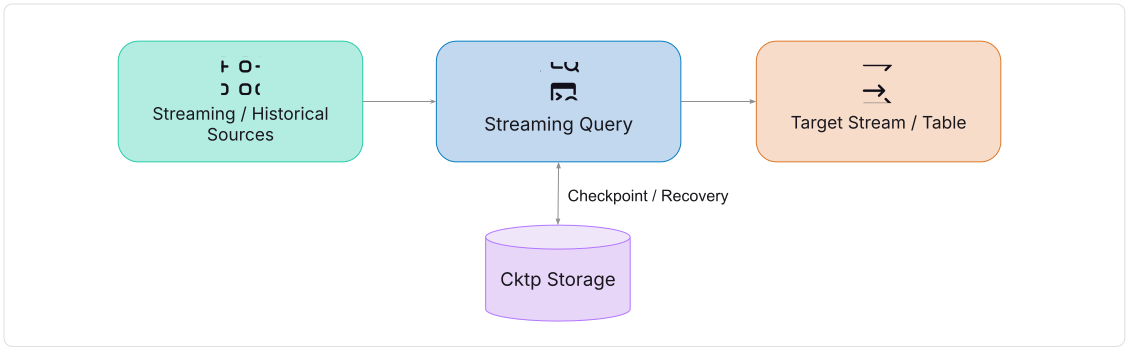
Tune Sources
Source reader tuning depends heavily on the data source type. In general, tuning involves trade-offs between concurrency, latency, and throughput.
Refer to the Connect Data In documentation for detailed settings per source. Below are some common examples.
Kafka Source
Kafka sources can be tuned via Kafka client properties.
Example:
CREATE EXTERNAL STREAM kafka_perf(raw string)
SETTINGS
  type='kafka',
  brokers='192.168.1.100:9092',
  topic='test',
  -- Tune Kafka client properties for higher throughput
  properties='queued.min.messages=10000000;queued.max.messages.kbytes=655360';
Puslar Source
Pulsar clients can be tuned with thread and connection settings.
Example:
CREATE EXTERNAL STREAM pulsar_perf(raw string)
SETTINGS
  type='pulsar',
  service_url='pulsar://localhost:6650',
  topic='persistent://public/default/test',
  -- Threads fine tune
  io_threads=4,
  -- Connection fine tune
  connections_per_broker=10,
  ...
Timeplus Stream Source
Fetch threads can be tuned, especially when zero replication is enabled.
CREATE STREAM timeplus_source (...)
SETTINGS
    shards=4,              -- Enable multi-shards
    shared_disk=...,       -- Enable shared disk for zero replication
    fetch_threads=2;       -- Concurrent fetch when shared disk is enabled
Tune Sinks
Similar to sources, sink tuning depends on the sink type. It usually involves latency, throughput, and concurrency trade-offs. Refer to the Send Data Out documentation for details. Below are examples.
Kafka Sink
Tune Kafka client properties to optimize write performance.
Example:
CREATE EXTERNAL STREAM kafka_perf(raw string)
SETTINGS
  type='kafka',
  brokers='192.168.1.100:9092',
  topic='test',
  -- Tune Kafka client properties for higher throughput
  properties='queue.buffering.max.messages=10000000;
              queue.buffering.max.kbytes=10485760;
              queue.buffering.max.ms=100';
Timeplus Stream Sink
Storage engine settings provide multiple tuning options.
Example:
CREATE STREAM timeplus_sink (...)
SETTINGS
    shards=4,                        -- Enable multi-shards
    logstore_flush_messages=1000,    -- fsync interval by messages
    logstore_flush_ms=1000,          -- fsync interval by time
    shared_disk=...,                 -- Shared disk for zero replication
    ingest_mode='async',             -- Async ingest
    ingest_batch_max_bytes=67108864, -- Max batch size with shared disk
    ingest_batch_timeout_ms=500;     -- Batch timeout threshold
ClickHouse Sink
Use connection pooling to improve throughput.
Example:
CREATE EXTERNAL TABLE clickhouse_tbl(...)
SETTINGS
    pooled_connections=32; -- Number of pooled connections
S3 Sink
Enable compression for more efficient writes.
Example:
CREATE EXTERNAL TABLE s3_tbl(...)
SETTINGS
    compression_method='zstd'; -- Use zstd for writing
Tune Streaming Query
Most queries work well with default settings, but advanced workloads may require fine-tuning. Settings fall into several categories:
Data Read & Processing
max_threads: Maximum threads for query execution (soft limit).0means the system will automatically pick a value which is usually the number of CPUs. Default: 0max_block_size: Maximum rows per read block. Default: 65409input_format_parallel_parsing: Enable parallel parsing (for supported formats). Default: truefetch_buffer_size: Remote fetch buffer size per query. Default: 64 * 1024 * 1024fetch_threads: Threads for fetching from shared disk. Default: 1record_consume_batch_count: Maximum number of records to consume in one batch. Default: 1000record_consume_batch_size: Maximum batch size in bytes. Default: 10 * 1024 * 1024record_consume_timeout_ms: Timeout for batch consumption. Default: 100
Data Write
max_insert_threads: Maximum threads for concurrent inserts (when possible).0means the system will automatically pick a value. Default: 0min_insert_block_size_rows: Minimum block size in rows before flushing to the target. Default: 65409min_insert_block_size_bytes: Minimum block size in bytes before flushing to the target. Default: 65409 * 256max_insert_block_size: Maximum block size in rows before forcing a flush (batch write). Default: 65409max_insert_block_bytes: Maximum block size in bytes before forcing a flush (batch write). Default: 1024 * 1024insert_block_timeout_ms: Timeout threshold (in ms) before forcing a flush (batch write). Default: 500output_format_parallel_formatting: Enable parallel formatting for certain output formats. Default: true
Data Shuffling
substreams: Used withSHUFFLE BY; number of substreams after shuffling.0means the system will automatically pick a number. Default: 0
Join
max_joined_block_size_rows: Maximum block size (in rows) for JOIN results.0means unlimited. Default: 65409join_algorithm: Algorithm for join execution (parallel_hash,hash,direct, etc.). Default: defaultjoin_max_buffered_bytes: Maximum buffered bytes for stream-to-stream joins. Default: 524288000join_buffered_data_block_size: Block size used when buffering data in memory; merges small blocks into larger ones for efficiency.0disables merging. Default: 0join_quiesce_threshold_ms: Maximum wait time (ms) when one side of the join is quiesced. Default: 1000join_latency_threshold: Controls when to align and start joining left/right streams.0lets the system choose the value automatically. Default: 0default_hash_join: Controls which hash join (memory or hybrid) implementation is used for streaming joins:. Default: memory
Aggregation
default_hash_table: Controls which hash table (memory or hybrid) is used for streaming queries (joins, aggregations). Default: memory- Emit strategy is also critical for tuning. See Streaming Aggregations: Emit Strategy for details.
Backfill
enable_backfill_from_historical_store: Enable backfill from historical data stores. Default: trueemit_during_backfill: Emit intermediate aggregation results while backfilling historical data. Default: falseforce_backfill_in_order: Controls if backfilling data to be processed strictly in sequence order which requires sorting according to_tp_snif it is true. Default: false
Miscellaneous
max_memory_usage: Maximum memory usage per query.0means unlimited. Default: 0count_distinct_optimization: RewriteCOUNT DISTINCTinto aGROUP BYsubquery for optimization. Default: falsejavascript_vms: Number of JavaScript VMs to use in one query (for executing JavaScript UDFs). Default: 1use_index: Apply a specific index when querying mutable streams. Default: ''enforce_append_only: For changelog storage, enforce append-only query mode. Default: false